Group Function in Lay Limits for AccuNest Placement
The AccuMark Lay Limits controls piece placement instructions passed to AccuNest. This new redesigned form has a new feature added specifically for AccuNest users.
A new column has been added to the Lay Limits to allow pieces to be grouped together to ensure quality when sending the Markers to AccuNest for placement. This new group feature will allow designated pieces in a bundle that sew together to be flipped/rotated as a unit to ensure they match up in grain and shading.
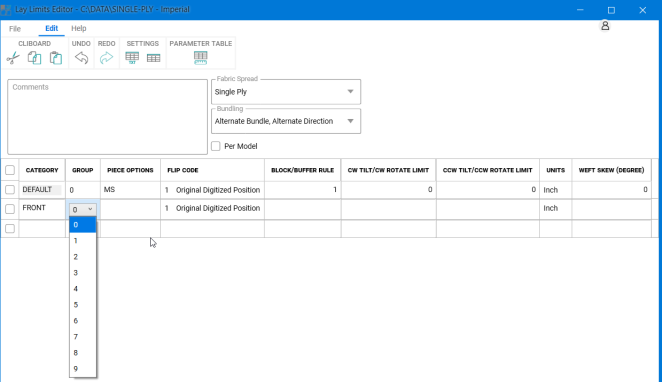
When nesting is complete, all pieces in any given bundle defined in this sewing relation (group) will be flipped/rotated to match up with each other, but, as in the past, only the flip/rotations defined will be permitted in nesting. This new identifier ensures these allowed placements are applied as a group, rather than individually.
The default value for the piece category of group is “0” which means the piece is not part of a group. A drop down allows pieces to be assigned to a group, with values 1-9 each representing a unique group. This allows 9 different groups to be established, which provides great flexibility for nesting with specific quality requirements. Each piece can only have one Group identifier.
Once a group has been designated for a piece, the pieces that follow that are in the same group will have rotation/flip and limit selections grayed out, as they will be established by the settings for the first piece listed as part of the group.
For example, if a Front, Back, and Yoke all must have the same orientation for quality purposes, and the Front is listed first as part of Group 1, then the Back and Yoke should also be Group 1. The flip/rotate entries for the Front will be automatically applied for the Back and Yoke.
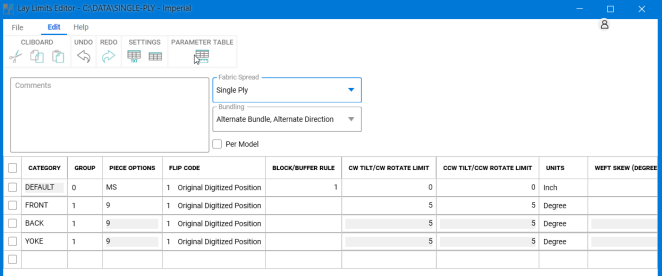
Group does allow the Flip Codes and the Block Buffer rules to be applied individually to pieces within the defined set. To use this feature with AccuNest, the software on the AccuNest server must be updated to v14.0 as well as the AccuMark Job Submission stations. Mixed software versions will not support this enhanced functionality.
Using Groups is not supported on data in prior software versions. If the group information is included and the marker data opened/modified on older versions, this group information is not maintained.